
在使用 Cursor Agent 开发时,经常会长时间卡死,比如在:planning next moves ,reading file …
推荐几种方式解决方案:
最简单的方式:关闭当前
chat,重新打开新的窗口。不行就整个cursor关闭后重启。切换
model, 避免用auto。不过我额度用完了只能用auto比如当前最新版本为:
2.4.x,降级到上一个主版本2.3.41,或者版本过老,升级到最新版本切换 网络/HTTP 模式(File/Preference/Cursor Settings),避免 vpn 等软件通讯问题
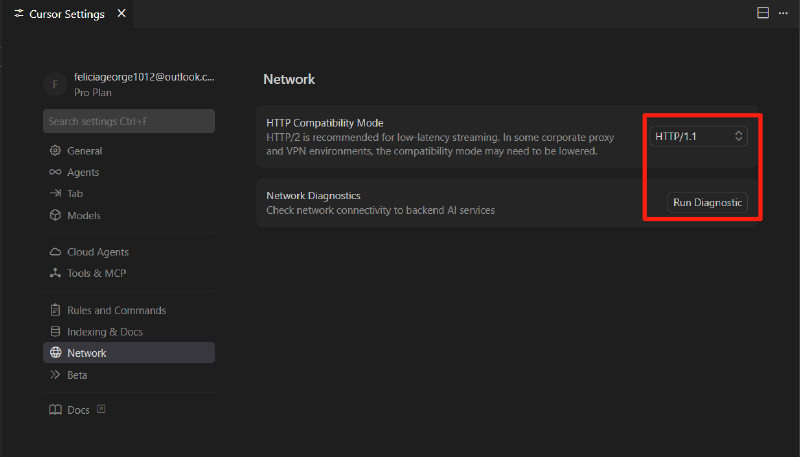
避免使用
HTTP/2模式,降级到HTTP/1.1,同时可以运行下Run Diagnostic对当前 IDE 环境做个检查。重新构建本地代码向量库
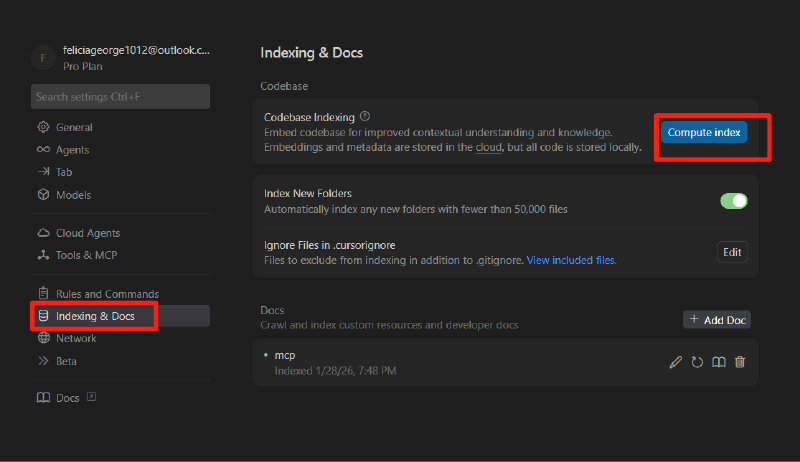
可能当前
workspace文件过多,创建的索引有问题,删除后再试试。