

Zod vs Ant Design 使用区别#
这是 Zod 的描述:它是一个以 TypeScript 优先(TypeScript-first)的验证库。通过 Zod,你可以定义模式(schemas),并利用它们来验证各种数据,从简单的 string 字符串 到复杂的 嵌套对象 都能涵盖。
Zodis aTypeScript-firstvalidation library. UsingZod, you can defineschemasyou can use to validate data, from a simplestringto a complex nested object. 轻量的Zod与Vue生态适配良好,只要梳理好schema,就能在前端与AI场景同时收获类型安全与稳定输出能力。
你肯定有些疑问:
- 它和
TypeScript有什么关系? - 什么是
schema? Zod能给项目带来什么收益?
下面我将用 Ant Design 表单自带的校验器和 Zod 作对比,来让大家更深入地了解 Zod。
一直用的的不一定对#
相比 JavaScript,TypeScript 已经帮我们增强对变量的检查,难道还不够么?我们从一个简单的登录表单开始:
<a-form v-bind="layout" :model="formState" @finish="onFinish" @finishFailed="onFinishFailed">
	<a-form-item label="Username" name="username" :rules="rules.username">
	  <a-input v-model:value="formState.username" />
	</a-form-item>

	<a-form-item label="Password" name="password" :rules="rules.password">
	  <a-input-password v-model:value="formState.password" />
	</a-form-item>
	...
</a-form>
根据表单项,我要定义好用户名和密码类型,来约束表单数据 formState,同时还要对表单项指定对应的规则:
interface UserType {
  username: string;
  password: string;
  remember: boolean;
}

const rules = {
  username: [{ required: true, message: 'Please input your username!' }],
  password: [{ required: true, message: 'Please input your password!' }],
};

const formState = reactive<UserType>({
  username: '',
  password: '',
  remember: true,
});

const onFinish = (values: UserType) => {
  console.log('Success:', values);
};
这看似很合理,我们已经习以为常了,但记住一直用的的不一定对,甚至还有潜在问题,试想下:如果有一天,用户名字段需要改为 name,我们会怎么做?
interface UserType {
  name: string; // username: string;
  // ...
}
这样就行了嘛?你遗漏了 rules.username,它应该改为 rules.name,由于数据对象和表单规则没有关联性,即使 TypeScript 也不能帮我们发现此类问题。
而 Zod 就可以优雅地解决:
import { z } from 'zod';

const UserSchema = z.object({
  username: z.string(),
  password: z.string().min(8),
  remember: z.boolean(),
});

type UserType = z.infer<typeof UserSchema>;
使用 z.object 来定义数据对象,它的 schema 结构已经具备了 rule 的校验规则。同时,z.infer 自带 自动推导类型 特性:
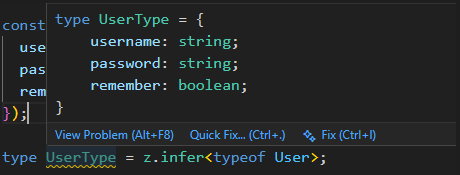
这样便可直接在回调函数中就引用这个静态类型推导的类型 UserType:
const onFinish = (values: UserType) => {
  console.log('Success:', values);/*  */
};
如果不用 Ant Design 的 rule 可以像这样手动为表单项做处理:
<a-form-item label="Username" name="username" v-bind="validateFields['username']">
  <a-input v-model:value="formState.username" @input="clearError('username')" />
</a-form-item>
// 仅供参考
const validateFields = reactive<{
[key in keyof UserType]?: { help: string; validateStatus: string };
}>({});
const clearError = (field: keyof UserType) => {
if (validateFields[field]) {
delete validateFields[field];
}
};
const onFinish = () => {
try {
const user = UserSchema.parse(formState);
console.log('Success:', user);
} catch (error) {
if (error instanceof z.ZodError) {
error.issues.forEach((issue) => {
const { path, message } = issue;
path.forEach((field) => {
validateFields[field as keyof UserType] = { name: String(field), help: message, validateStatus: 'error' };
});
});
console.error('Validation Error:', error.issues);
}
}
};Zod 的特性#
开箱即用#
在字符串 string 领域提供了丰富的验证工具集:
z.string().max(5); // 限制字符串最大长度为 5
z.string().min(5); // 限制字符串最小长度为 5
z.string().length(5); // 限制字符串长度固定为 5
z.string().regex(/^[a-z]+$/); // 校验字符串符合正则表达式
z.string().startsWith("aaa"); // 校验字符串以 aaa 开头
z.string().endsWith("zzz"); // 校验字符串以 zzz 结尾
z.string().includes("---"); // 校验字符串包含 ---
z.string().uppercase(); // 校验字符串为全大写
z.string().lowercase(); // 校验字符串为全小写
也支持对特定格式的校验:
z.email(); // 校验邮箱格式
z.uuid(); // 校验 UUID 格式
z.url(); // 校验 URL 格式
z.base64(); // 校验 Base64 编码
这些你可以在 官方文档 找到,如果还不够用,也支持自定义:
const coolId = z.stringFormat("cool-id", () => {
  // arbitrary validation here
  return val.length === 100 && val.startsWith("cool-");
});数值变换#
借助 transform 我们可以基于 pipe 管道实现链式的值变换:
const stringToLength = z.string().pipe(z.transform(val => val.length));
stringToLength.parse("hello"); // => 5
当然它也有一些语法糖,可以做些常用的处理:
z.string().trim(); // trim whitespace
z.string().toLowerCase(); // toLowerCase
z.string().toUpperCase(); // toUpperCase
z.string().normalize(); // normalize unicode characters
TypeScript 语法#
利用 Zod 的 pick、omit 方法,我们也能达到在 TypeScript 中的效果:
const Recipe = z.object({
  title: z.string(),
  description: z.string().optional(),
  ingredients: z.array(z.string()),
});

const JustTheTitle = Recipe.pick({ title: true }); // 只保留 title 字段
const RecipeNoTitle = Recipe.omit({ title: true }); // 去除 title 字段
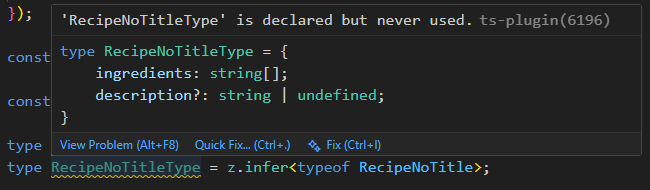
导出静态类型:
// type JustTheTitleType = Pick<Recipe, 'title'>;
type JustTheTitleType = z.infer<typeof JustTheTitle>;

// type RecipeNoTitleType = Omit<Recipe, 'title'>;
type RecipeNoTitleType = z.infer<typeof RecipeNoTitle>;
效果就像这样: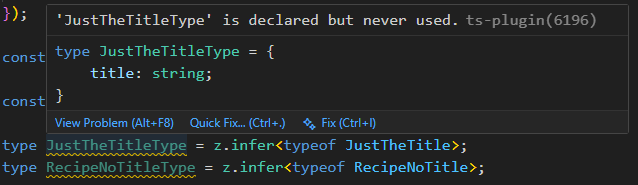
自定义错误 & 国际化#
注意到 Zod 校验异常时会提示:Too small: expected string to have >=1 characters 这类错误,但我们更希望将错误信息自定义,直接在 string 入参中维护即可:
z.string("Bad!");
z.string().min(5, "Too short!");
z.uuid("Bad UUID!");
z.iso.date("Bad date!");
z.array(z.string(), "Not an array!");
z.array(z.string()).min(5, "Too few items!");
z.set(z.string(), "Bad set!");
我们也能通过 config 设置国际化:
import { zhCN } from "zod/locales"
z.config(zhCN());
这样 Too small: expected string to have >=1 characters 就会变成 数值过小:期望 string >=8 字符。
在组合式 API 中可以把 schema 封装为自定义 hooks,让数据与校验在同一上下文中维护。
异步校验#
如果想实现异步校验,可以通过 refine 来精细化处理,同时验证时要将 parse 改为 parseAsync:
const UserSchema = z.object({
  username: z.string().min(1).trim(),
  password: z.string().refine(async (val) => {
    console.log('Validating password:', val);
    const valid = await new Promise((resolve) => {
      setTimeout(() => {
        resolve(false);
      }, 1000);
    });
    return valid;
  }, '密码错误'),
  remember: z.boolean(),
});


// const user = await UserSchema.parse(values);
const user = await UserSchema.parseAsync(values);
AI 里的 Zod#
在 Vercel 官方 AI SDK(ai 包) 的项目中,Zod 最常用于定义和校验用户输入(如聊天消息、表单参数等),尤其是在结合 Next.js AI 类项目里:
import { z } from 'zod';
import { streamText } from 'ai';

const chatInputSchema = z.object({
  message: z.string().min(1).max(1000).trim(),
  history: z.array(
    z.object({
      role: z.enum(['user', 'assistant']),
      content: z.string().min(1),
    })
  ).optional(),
});

const result = chatInputSchema.safeParse(input);
const { message, history = [] } = result.data;

const { textStream } = await streamText({
  model: openai('gpt-4o-mini'),
  system: 'You are a helpful assistant.',
  messages: [...history, { role: 'user', content: message }],
});
借助这套模式,前端可以放心地将 AI 生成的数据渲染到组件,不再担心字段缺失或类型漂移。
总结#
Zod 是一个面向 TypeScript 的运行时校验库,以类型安全、组合性强和零依赖著称,不仅能定义数据结构,还能在运行时精准捕获非法输入。
相比 Ant Design 等 UI 库内置的表单校验(通常仅用于前端交互反馈),Zod 更适用于全栈场景——尤其在 Next.js、tRPC 或 Vercel AI 项目中,它成为连接前端、服务端与大模型的安全桥梁。
在 AI 应用爆发的今天,Zod 不仅保障用户输入的合法性,更防止恶意或畸形数据污染模型调用,是构建可靠、可维护智能应用的基础设施。
赶紧再项目中用起来吧!🚀